
Email Marketing
BLACK FRIDAY 2026 EMAIL MARKETING: THE FULL SEND PLAN
In short: Black Friday 2026 is Friday, November 27. The stores that win it plan their emails backward from that date. Here’s how to pick your offer, get your list ready, and send the right email on the right day.
Searches for “Black Friday 2026” grew from 4,400 a month in February to 135,000 in September. Your customers are already looking. The question is whether your emails are ready when they decide to buy.
When is Black Friday 2026?
Black Friday 2026 is Friday, November 27. Here are the dates that matter for your emails.
| Date | Day | What it is |
|---|---|---|
| November 26 | Thursday | Thanksgiving |
| November 27 | Friday | Black Friday |
| November 28 | Saturday | Small Business Saturday |
| November 30 | Monday | Cyber Monday |
| December 1 | Tuesday | Our last-chance email |
Step 1: Pick one clear offer
Your emails can only sell the offer you give them. So pick it first.
- Keep it simple. “30% off frames” beats “up to 40% off select items.” People should get it in one look.
- Pick one code for the public sale. Give your best customers their own early code. That keeps it easy to track.
- Set a real end time. Pick a day and an hour, like Sunday at 11:59 PM. Then stick to it.
- Plan a second offer for Cyber Monday. A free gift with a minimum order works well. It gives people a new reason to buy.
- Don’t stack codes. Say one code at a time. It keeps your profit safe and your emails clear.
Step 2: Get your list ready before the sale
Your list is the one thing you own. You don’t bid against other stores to reach it. Get it ready now.
- Turn on a welcome email. People who sign up in November should get one email with the live offer right away.
- Grow the list before the 27th. The bigger your list on Black Friday, the more your emails can sell. A teaser with an early access sign-up helps.
- Clean out dead emails. Remove addresses that bounce. Sending to bad addresses pushes your emails out of the inbox.
- Check your settings. Make sure your store and your email tool both have the right sale dates and codes.
Step 3: Decide who gets which email
Not everyone should get every email. Split your list into a few groups.
| Group | What they get |
|---|---|
| Past buyers and VIPs | Early access with their own code |
| People who never bought | The public Black Friday launch |
| New sign-ups | One welcome email with the live offer |
| Anyone who just bought | A thank-you, and no more sale emails |
That last one matters most. Nothing burns a new customer faster than a “you forgot something” email for an order they already paid for.
The Black Friday 2026 email calendar
Every email has one job. Here’s the full run.
| Date | Its job | |
|---|---|---|
| Fri, Nov 13 | Teaser | Build interest. One button: join early access. No code yet. |
| Tue, Nov 24 | VIP early access | Reward your best customers first with their own code. |
| Fri, Nov 27, 6 AM | Black Friday launch | Offer and shop button before anyone scrolls. |
| Sat, Nov 28 | Social proof | Reviews and help picking the right product. |
| Sun, Nov 29 | Deadline | The real end time, like 11:59 PM tonight. |
| Mon, Nov 30 | Cyber Monday | A new offer. Not the old code with a new name. |
| Tue, Dec 1 | Last chance | A short note from the owner. The offer ends at 8 PM. |
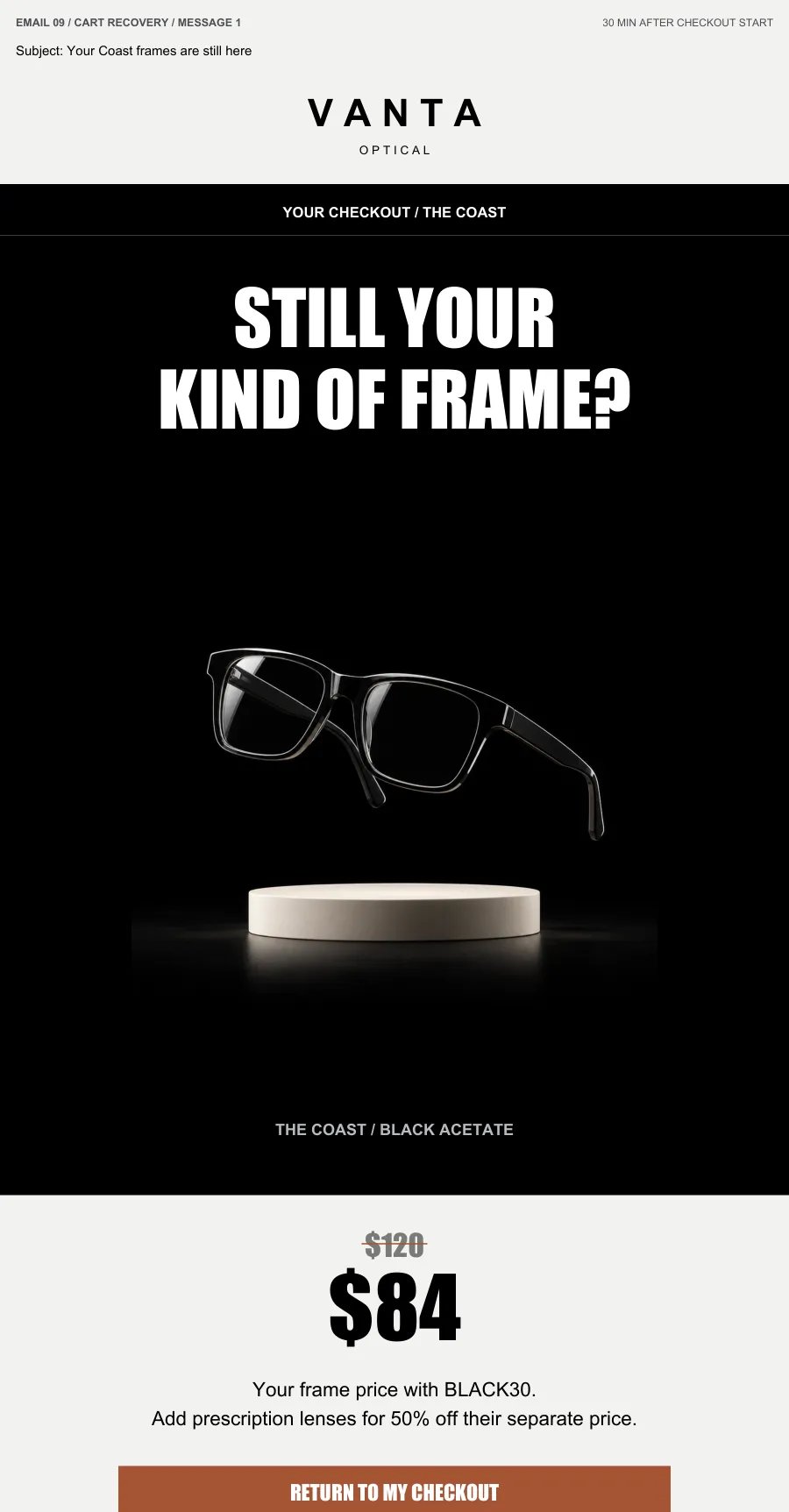
Here’s what two of them look like, from our sample campaign for an eyewear store.
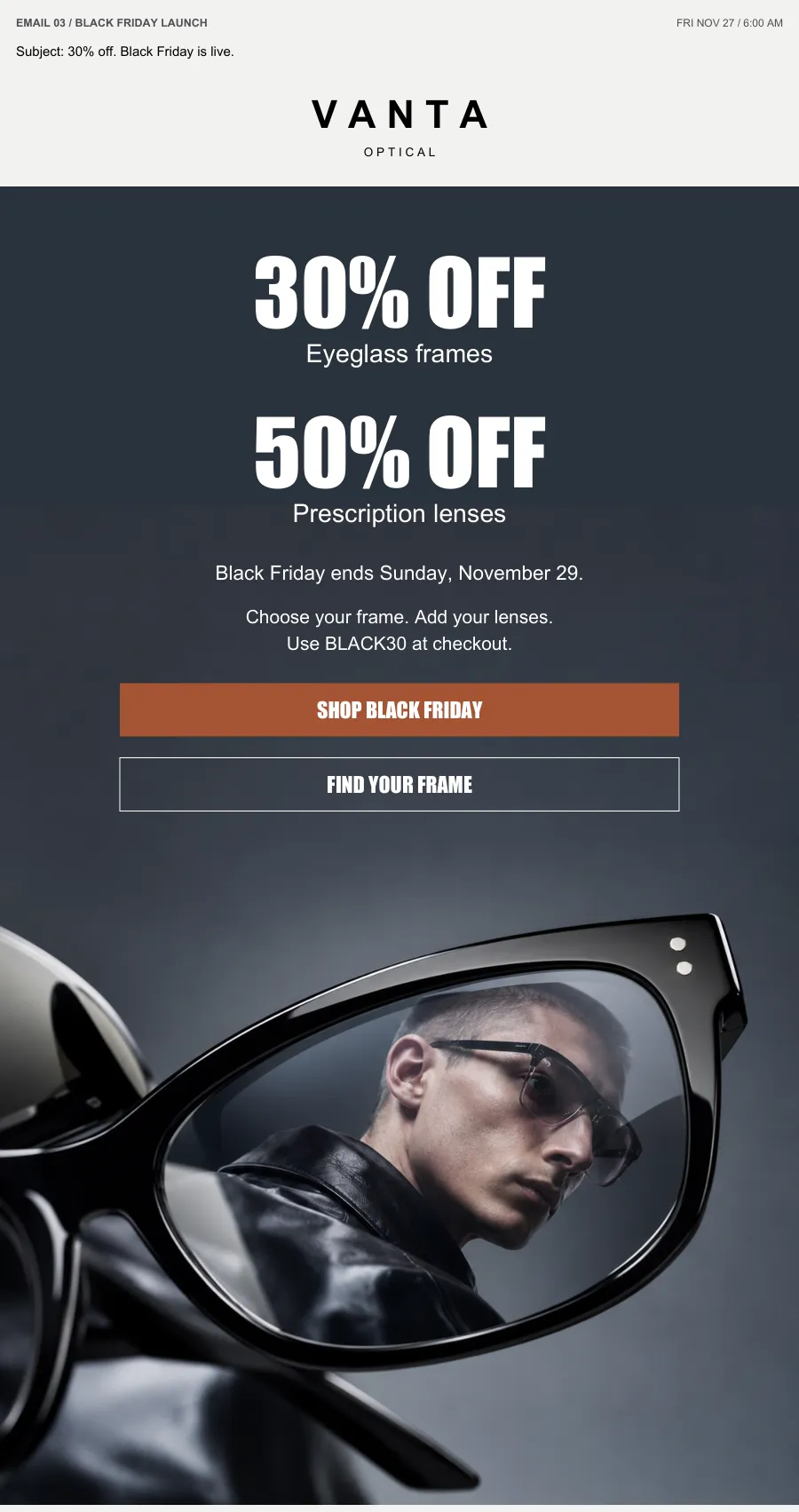
Why a teaser? People who raise their hand early are your warmest buyers. The teaser gets them on a list before the sale starts.
Why early access? Your repeat customers get a head start. Leave out anyone who already bought in the sale.
Why a new offer on Cyber Monday? Keeping the Black Friday code alive teaches people your deadlines are fake. Change the offer instead.
What is the best time to send a Black Friday email?
We send the Black Friday launch at 6 AM store time. It’s waiting when people wake up and check their phones.
The deadline email goes out late in the afternoon, hours before the sale closes. The last-chance email goes out at 4 PM for an 8 PM close. That leaves time to buy after work.
The emails that run on their own
The planned emails reach everyone. These five reach the right person at the right moment.
- Welcome. Someone signs up during the sale. They get one email with the live offer right away.
- Browse reminder. Someone looks at a product and leaves. Two hours later they get one reminder. No more than one every 48 hours.
- Cart reminder 1. Someone starts checkout and stops. Thirty minutes later they get a reminder.
- Cart reminder 2. Six hours after that, only if they still haven’t paid, the item is in stock, and the sale is still on.
- Thank you. Someone buys. They get a thank-you and leave every sale email right away.
Black Friday email subject lines that work
Good subject lines say what the reader gets and when it ends. No tricks. Here are the ones from our sample campaign.
- Your first look is coming
- Your early access is open
- 30% off. Black Friday is live.
- A little help picking your pair
- 30% off ends tonight
- A free case with your next pair
- The case offer closes at 8 tonight
Every one tells you the offer or the deadline in a few words.
The mistakes that cost Black Friday sales
Most lost sales come from things that are easy to check.
- The code doesn’t work at checkout. Test every code on every product it should cover.
- The email and the store disagree. If the email says midnight, the store must end at midnight.
- Buyers keep getting sale emails. A paid order must stop every reminder.
- Everyone gets everything. Cap how many emails one person gets in a day.
- The button breaks on a phone. Plenty of shoppers buy from their phone. Check every button there.
Is email still worth it for Black Friday?
Yes. Here’s what our email campaigns have done for online stores. We keep client names private.
| List size | Orders |
|---|---|
| 25,000 subscribers | 5,000+ orders on a $120 offer |
| 15,000 subscribers | 500+ orders |
| 10,000 subscribers | 200+ orders |
| 8,900 subscribers | 120+ orders |
Offers on these campaigns ranged from $39 to $120. Same idea every time: a clear offer, a real deadline, and the right email at the right moment.
How long does it take to set up?
First we plan, write and design. Then you approve the designs. We go live 3 business days after that. To send a teaser on November 13, the designs need a yes by Monday, November 9. The later you start, the fewer emails you get to send.
Black Friday 2026
Want us to build your Black Friday emails?
We plan the offer and the calendar, write and design every email, build it in your email platform, test it, and launch it. You approve the designs first. Built for stores with about 9,000 subscribers and up.
Book your BFCM call Black Friday email campaigns, done for you
Want to see the work first? Look through all 12 sample emails.
YOU MAY LIKE THIS
 Answering Service for Plumbers and HVAC: Book the Emergency, Not the MessageNov 1, 2026
 Appointment Setting for Service Businesses: Book the Lead in 5 MinutesNov 1, 2026
 Best Answering Service for Small Business: How to Pick the Right OneNov 1, 2026
Questions
When is Black Friday 2026?
When should Black Friday emails start?
How many emails should I send for Black Friday?
What is the best time to send a Black Friday email?
Should I keep my Black Friday code going on Cyber Monday?
Can you build my Black Friday emails for me?
Download your free book now
This $7 Million Marketing Playbook can get you more calls from the people already looking for you, in most cases WITHOUT spending another dollar on ads.