
Google Business Profile
GOOGLE BUSINESS HOME, EXPLAINED

In short: Google Business Home is a new Google tool. It puts your Business Profile, Ads, YouTube and Merchant Center in one place. It’s a closed beta in the US and UK. A closed beta means only some people get to try it early. You get in by invite only. You can’t sign up. Here’s what Google said. Here’s what no one knows yet. And here’s what to do with your profile now.
Searches for “google business home” went from 30 in August to 720 in September. Owners hear about Business Home. They want to know if they’re missing out. Most aren’t, yet. But the profile it sits on counts right now.
What is Google Business Home?
Google calls it a “growth partner built with Gemini models” on its help page. Gemini is Google’s AI. It “connects your essential business tools.” That means the tools you use most.
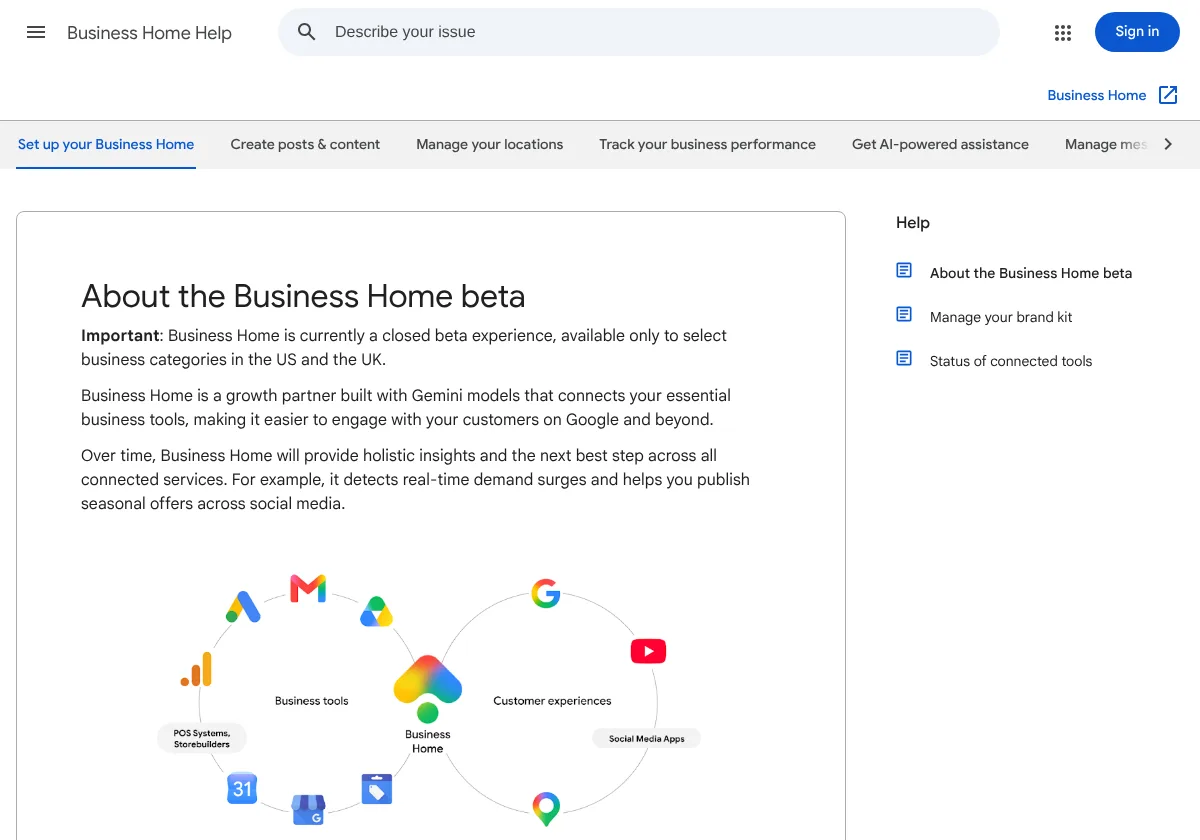
In plain words, Business Home is one screen. It holds the Google tools you already use. It launched on October 22, 2026 (Search Engine Roundtable). The beta “brings together your Business Profile, Merchant Center, YouTube, and Ads accounts all in one place.” That’s four tools on one screen.
Merchant Center is where stores list things they sell. Most trade shops don’t use it.
Google lists four things the beta does:
| What Google calls it | In plain words |
|---|---|
| “Create content” with AI and “studio-quality photo tools” | Helps you write posts and fix photos |
| “Manage locations” | Change your hours and answer reviews from one screen |
| “Proactive growth guidance” | Google tells you what to do next |
| “AI-powered messaging with RCS for Business” | Text with customers, with AI help |
Google also promises that “over time” it will give you “the next best step” for your tools. That’s for later. The beta doesn’t do it now.
Who can get Google Business Home?
Not everyone. The beta is “available only to select business categories in the US and the UK” (Google). You can get it only if:
- Your business is in the US or UK.
- You own or run a verified Google Business Profile.
- That business has fewer than 10 locations.
- You run just one kind of business. If you run lots of kinds, you can’t use it yet.
- You link just one YouTube channel. Same for Google Ads and Merchant Center. One each.
- You follow Google’s rules.
Google isn’t naming which kinds of businesses are in. Not roofers, not plumbers, not HVAC, not auto repair. Anyone who says they know is guessing.
How do you get access?
You wait for an email. Eligible businesses “will receive an email inviting you to Business Home.” Eligible means you can get it. Then you click “View your business home” to start.
There’s no sign-up form. There’s no wait list. Google has been sending it out slowly for a couple of months.
What Google left out
Google left a lot out. Here’s what’s missing:
- Price. None listed.
- Which categories. Just “select business categories.”
- When everyone gets it. There’s no date.
- If it changes rankings. Nothing shows it helps you rank higher on Google Maps.
- How the “next best step” tips work. Google names them. That’s it.
So don’t change how you market because of Business Home. Think of Business Home as a new screen for old tools.
What to do with your Business Profile right now
Business Home sits on top of your Business Profile. If your profile is weak, a nice screen won’t fix it. These things count today, invite or not:
- Pick the right primary category. That’s your main category. It’s the biggest ranking setting on your profile. Here’s how to check your Google Business Profile category.
- List every service you do. Fill in your services. Post often. Our guide to Google Business Profile services and posts shows you how.
- Get a review after every job. Then answer every review. Here’s how to get a review after every job.
- Do the full map checklist. Use our checklist to rank higher on Google Maps.
- Check your email. An invite goes to the email on your Google account. Make sure you still read it.
If the invite comes, try it. Your Ads and your profile in one place save you time. Judge it the way you judge any tool. Does it bring more calls and booked jobs?
Where we come in
A good profile is half the job. The other half is picking up the calls it brings. That’s where most local shops lose money.
Our local SEO and Google Business Profile work covers your profile and reviews. It covers posts and map rankings too. Do you also run Google Ads? Our Google Ads management ties your ads and profile to real leads. Gonzalez & Sons Roofing went from about 2 to 8 roofs a month. That came from our Google Ads, landing pages and follow-up.
YOU MAY LIKE THIS
 Does a Google Business Profile Cost Money? What's Free and What Isn'tOct 19, 2026
Questions
What is Google Business Home?
Can I sign up for Google Business Home?
Who is eligible for the Business Home beta?
Does Google Business Home replace my Google Business Profile?
Does Google Business Home cost money?
What should I do while I wait for an invite?
Download your free book now
This $7 Million Marketing Playbook can get you more calls from the people already looking for you, in most cases WITHOUT spending another dollar on ads.